
In this tutorial we calculate air humidity using a temperature sensor, a damp cloth and a data logger.
Equipment
- Metal base PS2030.27
- Metal support rod PS2030.28
- Boss PS2030.29
- Metal rod with metal clamp PS2030.30
- Temperature sensor RS104
- Data logger DL100
- Windows PC with iLab software

Safety Note
No personal safety requirements for this experiment.
For the proper usage of the Temperature sensor please read the instruction manual before.
- Set up the metal base and metal support rod.
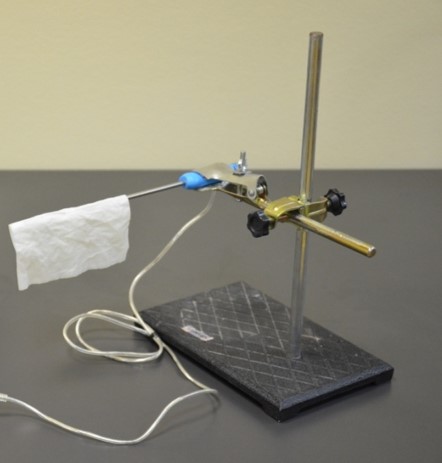
- Fix metal rod with metal clamp in such way that it can hold the temperature sensor from the handle on a horizontal axis.
- Plug the temperature sensor into port #1 of the data logger, turn it on and select the meter option.

- Note the temperature reading, this is the air temperature and we will call it “dry sensor temperature – Tds”
- To proceed, wet your towel and put it on the temperature sensor in such way that the sensor is exposed to the air flow, as in picture.
- As you measure the new temperature, take a piece of paper and wave it close to the sensor to blow air on it. You should notice that the temperature readings are decreasing. Continue that motion until the temperature is stabilized and keep a note of that temperature. We will call this “wet sensor temperature – Tws”.
- The rate of evaporation from the wet towel on the bulb, and the temperature difference between the dry sensor and wet sensor, depends on the humidity of the air. The evaporation is reduced when the air contains more water vapor.
- The wet bulb temperature is always lower than the dry bulb temperature but will be identical with 100% relative humidity (the air is at the saturation line).
- Relative humidity can be estimated from the table hereunder.

Question 1
When water changes phase, what always happens?
- It’s raining.
- It’s snowing.
- A cloud is formed.
- Latent heat is consumed or released.
Question 2
Which of the following phrases is correct?
- Condensation absorbs heat and warms the atmosphere.
- Evaporation absorbs heat and warms the atmosphere.
- Evaporation absorbs heat and cools the atmosphere.
Question 3
The ratio of the actual amount of water in the atmosphere to the utmost at the same temperature is
- the absolute humidity.
- the dew point temperature.
- the specific humidity.
- the relative humidity.
Question 4
The higher relative humidity during the day is usually observed
- at dawn.
- early in the afternoon.
- at sunset.
- in the afternoon.
- around midnight.
End of tutorial